You must log in or # to comment.
deleted by creator
Welcome to modern astroturfing in the social media age.
There is a build page on the github for the device.
deleted by creator
Is there? Mind sharing the link?
I’ll find it after Christmas. I got a fork a bit ago when looking at the code.
I think its based on https://github.com/atomic14/diy-esp32-epub-reader
Build logs: https://hackaday.io/project/204323-diptyx-e-reader
Those aren’t build logs. Those are “I took an open source software package and put commercial hardware around it.”
Which is fine, since it’s MIT software (and why I push for GPL, personally). What’s not fine is a creator calling their commercial product “open” or “DIY” without a BOM or build log.
I would revise the post title regardless of what the author calls it, personally.
Looks really nice. How much do you want for one? Surely not more than twice as much as the competition needs. /s
I’ll wait until they make one with 300 screens I can flip like a book.
And each screen has infinite battery life! Oh and each is as flexible and light as I dunno, a sheet of paper maybe!
imagine a book you could plug in to change into a different book
I want VR recreations of famous libraries with full on books you can take off the shelves to read and homeless people washing their feet in the bathroom sinks
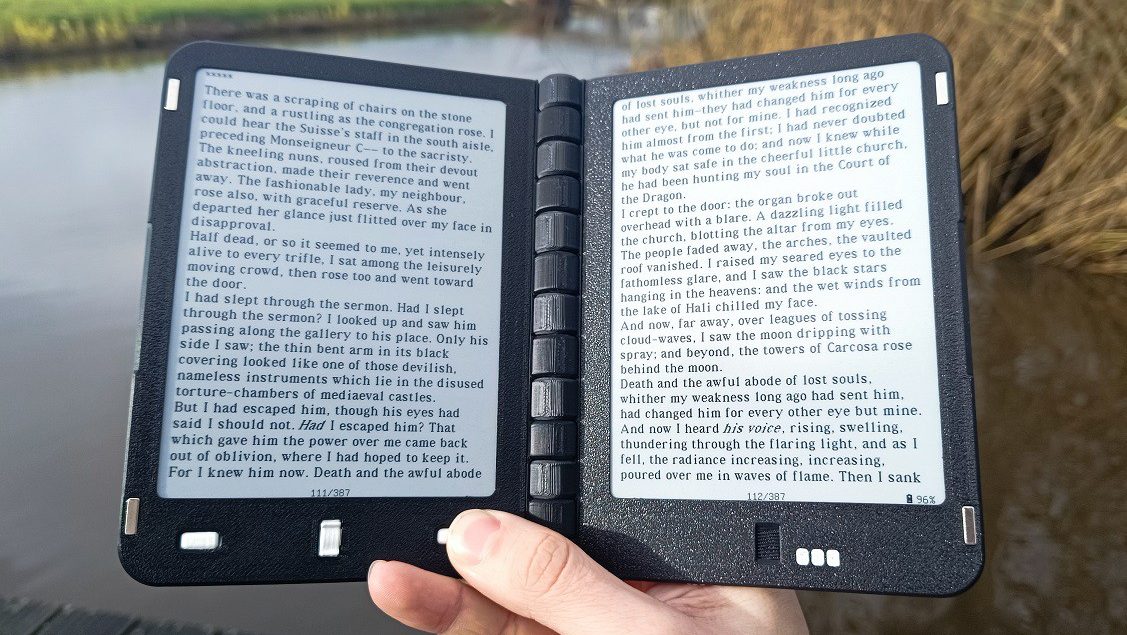
pair of 648×480 e-paper displays
Um lol no. I could see using a pair of Inkplate 10’s connected by (at least metaphorical)) duct tape. Doesn’t seem worth mucking with special hardware.
Every affordable e-reader I know of is simply too small though. I mostly want to read stuff like ArXiV preprints (A4 sized pdf’s) so would want at least a 13" screen. Someone a few days ago posted a link to a 14" Android tablet with a semi-reflective display at around $300. It seemed interesting but I’d rather degoogle.
There are some hinged Waveshare displays that look nice but they are regular TFT displays so wouldn’t be great for a portable e-reader with long battery time:
https://www.waveshare.com/product/displays/15.6inch-dual-monitor.htm
I hope you get what you want. Me I want something I could put in my pocket.
The small kobo kinda fits in a jean pocket, easily in cargo shorts or inside jacket pocket. Only comfortable for reading novels though. I prefer a little bigger even if it isnt pocket size.
Oh hmm, I just use my phone for that. It doesn’t seem worth having an additional, limited purpose device. I assume a 7" e-reader is too big for a pocket.
The Inkplate 10 isn’t pocketable but it’s very light, easy to put in your backpack or whatever. I just wish they had a 13" version. The 13" Ipad Air is really very nice if you don’t mind Apple products.
There are also some folding phones now with largish screens. A buddy of mine has one and it’s nice. Too expensive for me though, and it’s more Android.
Yeah most 7" readers have the page turning buttons on the side which usually makes the device too wide for pockets.
The 6" readers fit my pocket quite well… So a foldable dual screen 6" sound like a pretty nice upgrade.
Most of what I use my readers for are reflowable text like epubs… But I guess if you could show a single page from a PDF across both screens then it might actually be big enough to be able to read while still being pocketable… You would probably want to go with the high resolution e-ink screens, like the one in the Kobo Clara HD (1072 x 1448). A combined resolution of two of those would be 2144 x 1448,
Being able to fold down a larger “sheet” display so that it fit in a pocket would be pretty cool. Having extra room for reading things like maps and comic books is so much better than pinching and zooming on a pocket sized display. What you call limited purpose, I call functional design. I’m kind of over all-in-one devices. They’ve turned into Jack of all trades, but master of none.
Obviously that’s not what this device is, but it got me thinking about why I’d want a device with multiple e-ink displays or a foldable display.
Hello there, just scrolling through and I saw your comment. You seem to know a bit about this topic. I’m currently thinking of buying a reader as I lost mine some time ago. I used a kobo and a kindle in the past and didn’t see much difference. However, this thing about reading papers seems really cool. I have tried in the past reading PDFs on those readers without much success.
Do you think you have good options for reading articles/manuals? Consider I end up printing about 50 pages a day in articles I read. If I can turn that into something digital that’d be cool.
If an 8-inch screen is enough for you, then I recommend either the Pocketbook Inkpad 4, or the Pocketbook Color 3 if you want color. They run Linux and have a very capable PDF Reader (especially compared to Kindles)
If you want an even bigger screen then sadly they start to get very expensive, and usually ship with an already outdated version of Android and an underpowered SOC. And they also have the terrible standby battery life you would expect from an Android device
Give PineTab a look. Pine64 makes open source hardware that is pretty cool.
This? https://pine64.org/devices/pinetab/
It’s just 10" and looks like an old design. Micro USB, oops. The Inkplate is 10" ESP32 epaper so it uses very little power. Alternatively there are tablet-style x86 laptops and I almost bought one last year. Now the price is way up due to DRAM shortages and so on, oops. I have some scrounged HDMI monitors so I want to try using one in portrait mode with my raspberry pi 400. If that works I could see getting one of the Waveshare dual screen monitors and maybe a Pi 500+.
EInk gets expensive fast as the size gets bigger. At 10” its hard not to just use an lcd and bigger battery.
I don’t like the fact that it has two displays. It’s unnecessary and makes it thicker and heavier.
How else would it recreate a book unless it had a folding display which would be even worse?
Books are made like this because it’s impossible to make them any other way, but a digital device can have just one “page” since you read one page at time like Kindles and Kobos
For some people, recreating the form factor of a book is the point, regardless of its convenience or cost. I’m sure whoever put this thing together was quite aware of how mainstream e-readers are built and didn’t want that, or they would have bought a Kindle or a Kobo.
The other option is a scroll. historicaly I’m told a book was always a scroll and the factor we now call a book was a codex. (I don’t know how to verify this)
Go old school and have it recreate a scroll. Really, not having to shift your head/eyes when reading is a plus with r-readers.
Nevermind the fact most readers and tablets come -with- a cover … So its almost like a book anyway. Which people fold behind the page. Like a book. What was that extra screen doing again?
[This comment has been deleted by an automated system]
Why not hundreds of screens so you can present all pages of a book at the same time and you just skip through the screen? Would be so much more convenient and innovative!
The only reason I’d want 2 “pages” is so I could close it to protect the screen(s)… but that’s exactly what covers are for.
Apart from the tiny minority of people who might prefer the form factor/“book feel”, are there any actual advantages to having 2 screens for general reading?
It’s probably just for the people who want it. I have thought about how much nicer two pages would be in the past for this reason and for displaying sheet music.
Look. Hackaday… If it’s a slow week… We get it. Take a day off. We still like you. Just… Less of this please.
I read for hours on my tablet just fine. I don’t even see the need for e-ink displays, let alone this form factor. Also, I find the tablet easier to hold for hours, compared to a book.
In spite of all that, I kind of want one, I’ll admit. I have a 3D printer, maybe I’ll make one.
E-paper is easier to use outside or in bright light, and the battery tends to last longer. Anecdotally, it also doesn’t hurt my eyes as much.
And by “tending to last longer” it is good to note that it almost always lasts 5x-10x longer, as in you only need to charge it once a month instead of every few days with medium reading, depending on backlight usage.
When I only read a few pages a day because of my schedule, my battery lasts over 6 months easily. Meanwhile my unused iPad has to be charged every week or so even if it is used 0 minutes.