
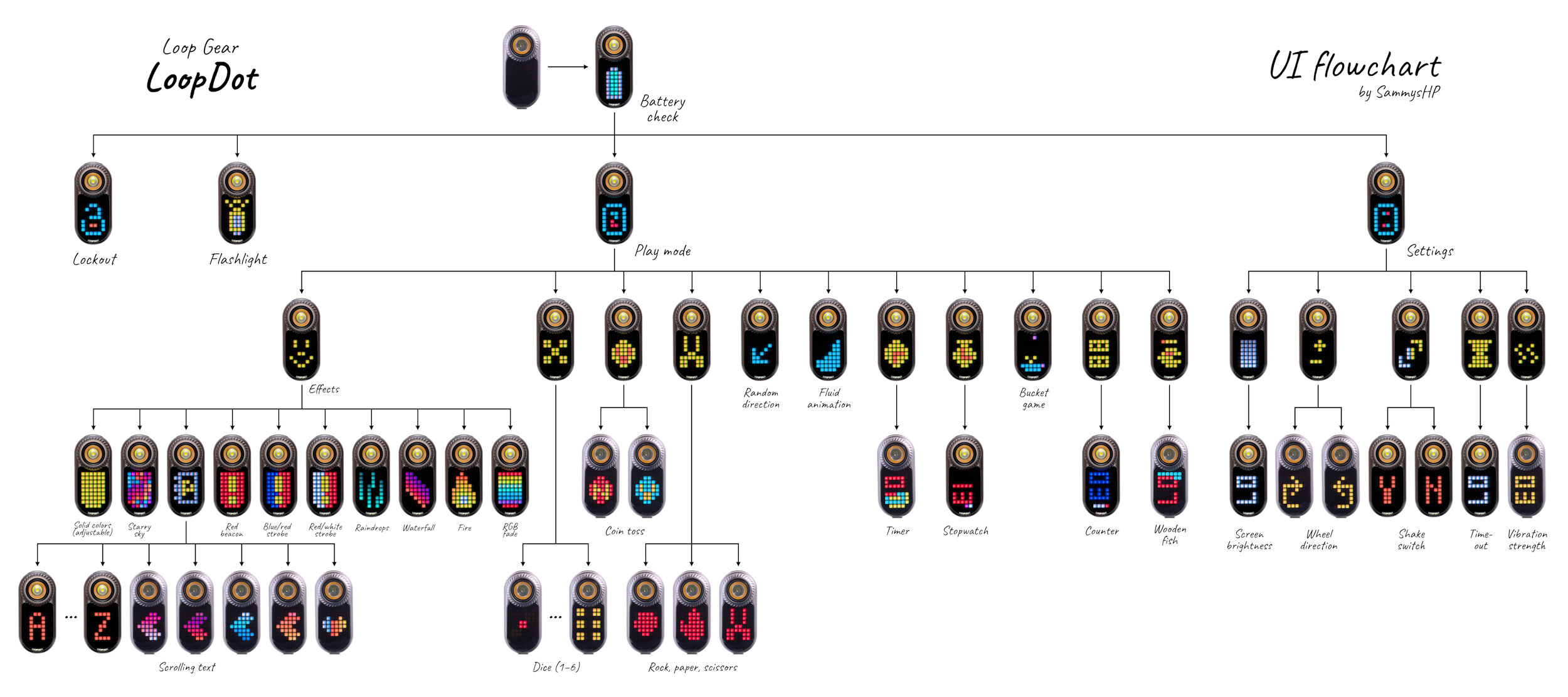
Here is an updated version of my LoopDot UI flowchart, after receiving the release model of the flashlight.
Major changes:
- There’s now a single flashlight mode to quickly turn the light on and off. Press 4C to return back to the menu.
- Shake the light to switch throw/flood channels. This feature can be turned off in the settings. You can still switch between the channels by holding the button.
- A new lockout mode protects the flashlight from accidental activation. Turn the wheel to unlock.
- New scrolling text mode that allows you to enter an arbitrary text. Scroll through the characters and press the button to add it to the text. When you’re finished, 3C starts scrolling the text.
- New random direction mode. Just like the dice or coin flip, just for directions.
- There’s also a new stopwatch mode with lap times. 1C start the time and takes a lap. Rotating the wheel or 3C stops the stopwatch. 5C resets everything to zero.
- If you have too many flashlights, you can use the new counter mode to count them! A press of the button or turning the wheel increments the counter. You can switch between multiple counters with 3C. Press 5C to reset the counter.
- Bored? Try out the new bucket game (“catch the gems”) with three levels of hardness.
- Timer mode was fixed and now properly counts 60 seconds each minute (instead of 52 seconds). For this, the bottom row counts three seconds for each pixel, with different colors. Press 3C to quickly set it to 10s, 30s, 60s, 1min, 10minm, 30min or 60min.
Other changes:
- Vibration and brightness settings are now from 1 to 10 instead of 1 to 20.
- You can adjust the auto-off timeout.
- Vibration when using the scroll wheel was turned off to prolong the lifetime of the vibration motor.
In the next weeks I will update my review of the LoopDot accordingly.
You must log in or # to comment.